Using Jitter Object Callbacks in JavaScriptColorspacesJitter Tutorials
Tutorial 48: Frames of MSP signals
In Tutorial 27: Using MSP Audio in a Jitter Matrix we learned how to use the jit.poke~ object to copy an MSP audio signal sample-by-sample into a Jitter matrix. This tutorial introduces jit.catch~, another object that moves data from the signal to the matrix domain. We'll see how to use the jit.graph objects to visualize audio and other one-dimensional data, and how jit.catch~ can be used in a frame-based analysis context. We'll also meet the jit.release~ object, which moves data from matrices to the signal domain, and see how we can use Jitter objects to process and synthesize sound.
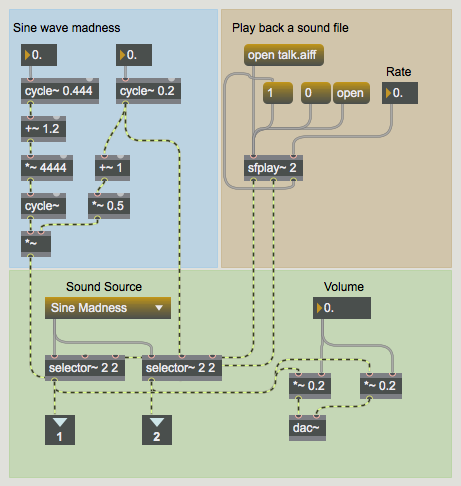
The patch is divided into several smaller subpatches. In the upper left the audiopatcher contains a network labeled Sine wave madness where some cycle~ objects modulate each other. Playback of an audio file is also possible through the sfplay~ object in the upper-right hand corner of the subpatch.
Inside the Audio patcher.
Basic Viz
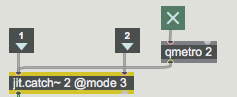
Click the message box labeled dsp start to begin processing audio vectors.Open the patcher named basic visualization. Click on the toggle box connected to the qmetro object.Capturing and outputting the audio signals as Jitter matrices.
In the basic visualizationpatcher the two signals from the audiopatcher are input into a jit.catch~ object. The basic function of the jit.catch~ object is to move signal data into the domain of Jitter matrices. The object supports the synchronous capture of multiple signals; the object's first argument sets the number of signal inputs; a separate inlet is created for each. The data from different signals is multiplexed into different planes of a float32 Jitter matrix. In the example in this subpatch, two signals are being captured. As a result, our output matrices will have two planes.
The jit.catch~ object can operate in several different ways, according to the mode attribute. When the mode attribute is set to 0, the object simply outputs all the signal data that has been collected since the last bang was received. For example, if 1024 samples have been received since the last time the object received a bang, a one-dimensional 1024 cell float32 matrix would be output.
The object's mode 1 causes jit.catch~ to output whatever fits in a multiple of a fixed frame size, the length of which can be set with the framesize attribute. The data is arranged in a two dimensional matrix with a width equal to the framesize. For instance, if the framesize were 100 and the same 1024 samples were internally cached waiting to be output, in mode 1 a bang would cause a 100x10 matrix to be output, and the 24 remaining samples would stay in the cache until the next bang. These 24 samples would be at the beginning of the next output frame as more signal data is received.
When working in mode 2, the object outputs the most recent data of framesize length. Using the example above (with a framesize of 100 and 1024 samples captured since our last output), in mode 2 our jit.catch~ object would output the last 100 samples received.
In our basic visualization subpatch, our jit.catch~ object is set to use mode 3, which causes it to act similarly to an oscilloscope in trigger mode. The object monitors the input data for values that cross a threshold value set by the trigthresh attribute. This mode is most useful when looking at periodic waveforms, as we are in this example.
Note that mode 0 and mode 1 of the jit.catch~ object attempt to output every signal value received exactly once, whereas mode 2 and mode 3 do not. Furthermore, the matrices output in mode 0 and mode 1 will be variable in size, whereas those output in mode 2 and mode 3 will always have the same dimensionality. For all modes, the jit.catch~ object must maintain a pool of memory to hold the received signal values while they are waiting to be output. By default the object will cache 100 milliseconds of data, but this size can be increased by sending the object a bufsize message with an argument of the desired number of milliseconds. In mode 0 and mode 1, when more data is input than can be internally stored, the next bang will not output a matrix but instead will cause a buffer overrun message to be output from the dump (right-hand) outlet of the object.
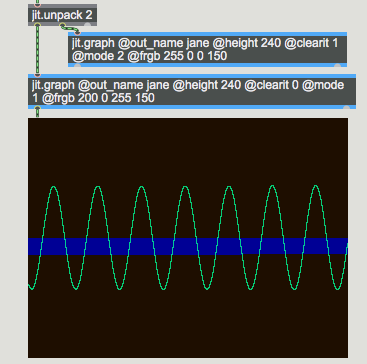
Our basic visualization of the audio data.
Since the two signals are multiplexed across different planes of the output matrices, we use the jit.unpack object to access the signals independently in the Jitter domain. In this example, each of the resulting single-plane matrices is sent to a jit.graph object. The jit.graph object takes one-dimensional data and expands it into a two-dimensional plot suitable for visualization. The low and high range of the plot can be set with the rangehi and rangelo attributes, respectively. By default the graph range is from -1.0 to 1.0.
These two jit.graph objects have been instantiated with a number of attribute arguments. First, the out_name attribute has been specified so that both objects render into a matrix named jane. Second, the right-hand jit.graph object (which will execute first) has its clearit attribute set to 1, whereas the left-hand jit.graph object has its clearit attribute set to 0. As you might expect, if the clearit attribute is set to 1 the matrix will be cleared before rendering the graph into it; otherwise the jit.graph object simply renders its graph on top of whatever is already in the matrix. To visualize two or more channels in a single matrix, then, we need to have the first jit.graph object clear the matrix (clearit 1); the rest of the jit.graph objects should have their clearit attribute set to 0.
The jit.graph object's height attribute specifies how many pixels high the rendered matrix should be. A width attribute is not necessary because the output matrix has the same width as the input matrix. The frgb attribute controls the color of the rendered line as four integer values representing the desired alpha, red, green, and blue values of the line. Finally, the mode attribute of jit.graph allows four different rendering systems: mode 0 renders each cell as a point; mode 1 connects the points into a line; mode 2 shades the area between each point and the zero-axis; and the bipolar mode 3 mirrors the shaded area about the zero-axis.
Frames
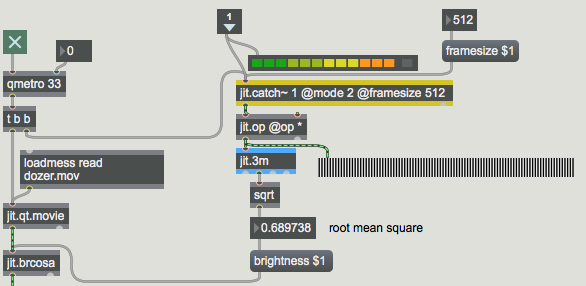
Turn off the qmetro (by un-checking the toggle box) and close the basic visualization subpatch. Open the patcher named frame-based analysis and click the toggle box inside to activate the qmetro object.Performing a frame-based analysis of our audio.
The frame-based analysis subpatch shows an example of how one might use the jit.catch~
object's ability to throw out all but the most recent data. The single-plane output of
jit.catch~ is being sent to a jit.op object which is multiplying it by itself, squaring each
element of the input matrix. This is being sent to a jit.3m object, and the mean value of the
matrix is then sent out the object's middle outlet to a sqrt object. The result is that we're
calculating the root mean square (RMS) value of the signal – a standard way to measure
signal strength. Using this value as the argument to the brightness attribute of a jit.brcosa object, our subpatch maps the amplitude of the audio signal to brightness of a video image.
Our frame-based analysis technique gives a good estimate of the average amplitude of the
audio signal over the period of time immediately before the jit.catch~ object received its
most recent bang. The peakamp~ object, which upon receiving a bang outputs the highest
signal value reached since the last bang, can also be used to estimate the amplitude of an
audio signal, but it has a couple of disadvantages compared to the jit.catch~ technique, which examines only the final 512 samples, thereby striking a balance between accuracy and efficiency. The effect that this savings makes is amplified in situations where the analysis itself is more expensive, for example when performing an FFT analysis on the frame.
Turn off the qmetro and close the frame-based analysis subpatch. Open the patcher named audio again and enter a 0 into the number box connected to the *~ objects at the bottom of the patch; the generated signals will no longer be sent to your speakers. Close the audio subpatch and open the patcher named processing audio with jitter objects.Using Jitter objects to process audio data, transforming the results back into signals.
The jit.release~ object is the reverse of jit.catch~: multi-plane matrices are input into the
object which then outputs multiple signals, one for each plane of the incoming matrix.
The jit.release~ object's latency attribute controls how much matrix data should be buffered
before the data is output as signals. Given a Jitter network that is supplying a jit.release~
object with data, the longer the latency the lower the probability that the buffer will
underflow – that is, the event-driven Jitter network will not be able to supply enough data
for the signal vectors that the jit.release~ object must create at a constant (signal-driven) rate.
Click on the toggle box into the subpatch to start the qmetro object. You should begin to hear our sine waves mixed with white noise (supplied by the noise~ object). Change the value in the number box attached to the message box labeled val $1. Note the effect on the amplitude of the sounds coming from the patch.
The combination of jit.catch~ and jit.release~ allows processing of audio to be
accomplished using Jitter objects. In this simple example a jit.op object sits between the
jit.catch~ and jit.release~ objects, effectively multiplying all three channels of audio by the
same gain. For a more involved example of using jit.catch~ and jit.release~ for the
processing of audio, look at the jit.forbidden-planet example, which does frame-based FFT processing in Jitter.
Varispeed
Stop the qmetro and close the subpatch. Open the patcher named interpolating .
The jit.release~ object can operate in one of two modes: in the standard mode 0 it expects
that it will be supplied directly with samples at the audio rate – that is, for CD-quality
audio the object will on average receive 44,100 float32 elements every second and it will
place those samples directly into the signals. In mode 1, however, the object will interpolate
in its internal buffer based on how many samples it has stored. If the playback time of
samples stored is less than the length of the latency attribute, jit.release~ will play through
the samples more slowly. If the object stops receiving data altogether, playback will slide
to a stop in a manner analogous to hitting a turntable platter's stop button. On the other
hand, if there are more samples than needed in the internal buffer, jit.release~ will play through the samples more quickly.
One can use this feature to generate sound directly from an event-driven network. The
interpolating release~ subpatch shows a way for us to do this. The data that drives the
jit.release~ object in this subpatcher receives data from a jit.buffer~ object, which allows us
to extract data from audio samples in matrix form using messages to the MSP buffer~
object. The jit.buffer~ object is essentially a Jitter wrapper around a regular buffer~ object;
jit.buffer~ will accept every message that buffer~ accepts, allows the getting and setting
of buffer~ data in matrix form, and also provides some efficient functions for visualizing
waveform data in two dimensions, which we use in this patch in the jit.pwindow object at
right. At loadbang time this jit.buffer~ object loaded the data in the sound file talk.aiff.
Turn on the toggle box connected to the qmetro object in the subpatch. Play with the number boxes labeled period and length ratio and the slider object labeled start.Playing back interpolated audio data from a sound file in Jitter.
The rate of the qmetro determines how often data from the jit.buffer~ object is sent down towards the jit.release~ object. The construction at the top maintains a ratio between the period and the number of samples that are output from jit.buffer~. Experimenting with the start point, the length ratio, and the output period will give you a sense of the types of sounds that are possible in this mode of jit.release~.
Summary
In this Tutorial we were introduced to jit.catch~, jit.graph, jit.release~, and jit.buffer~ as objects for storing, visualizing, outputting, and reading MSP signal data as Jitter matrices. The jit.catch~ and jit.release~ objects allow us to transform MSP signals into Jitter matrices at an event rate, and vice versa. The jit.graph object provides a number of ways to visualize single-dimension matrix data in a two-dimensional plot, making it ideal for the visualization of audio data. The jit.buffer~ object acts in a similar manner to the MSP buffer~ object, allowing us to load audio data directly into a Jitter matrix from a sound file.
Report min/mean/max valuesAdjust image brightness/contrast/saturationA matrix-friendly MSP buffer~Transforms signal data into matricesFloating-point data visualizationApply binary or unary operatorsPlay or edit a movieTransforms matrix data into signals
 Inside the Audio
  Capturing and outputting the audio signals as Jitter matrices.
 Our basic visualization of the audio data.
 Performing a frame-based analysis of our audio.
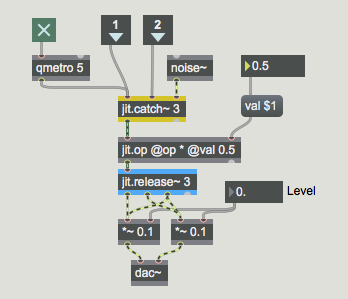 Using Jitter objects to process audio data, transforming the results back into signals.
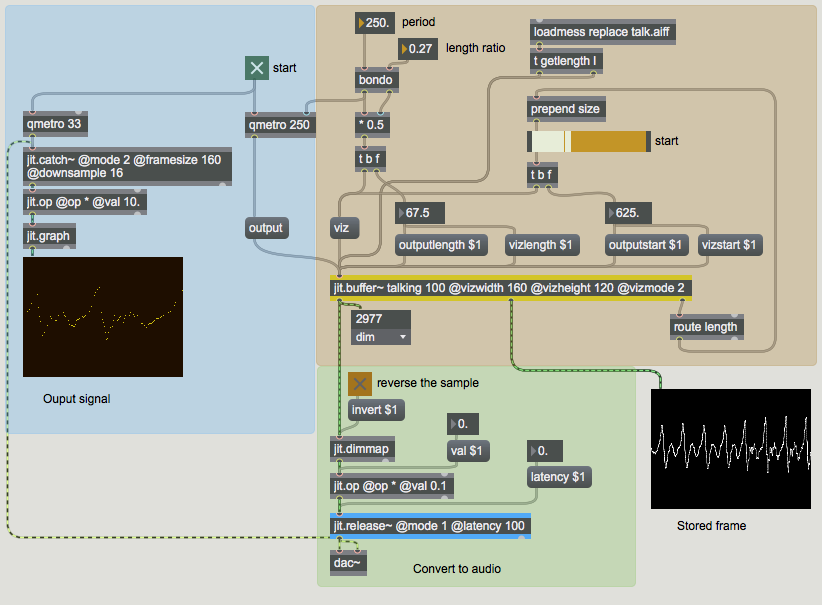 Playing back interpolated audio data from a sound file in Jitter.